Home / Replace analog lines
Why analog lines cost so much, and how to replace them
Phone companies are shutting down the copper network and raising prices on the lines that remain. Here's what's happening, and how a small adapter lets you cancel those lines.

Why analog lines are getting so expensive
A traditional analog line, often called a POTS line ("plain old telephone service"), runs over copper wire from the phone company. For decades these lines were cheap and predictable. That is changing quickly, for a few reasons.
The copper network is being retired
The major carriers are phasing out copper and moving customers to fiber, wireless, and internet-based service. Federal rules have made it easier for carriers to stop selling copper service and to discontinue it, often with a few months' notice. Retirement happens area by area, so there's no single national shutdown date. In New Jersey and much of the Northeast, retirements are moving ahead one local service area at a time.
Fewer customers share the cost
Most people have moved to cell phones and internet calling, but a copper network still costs about the same to maintain. With far fewer lines paying for it, the cost per remaining line keeps rising.
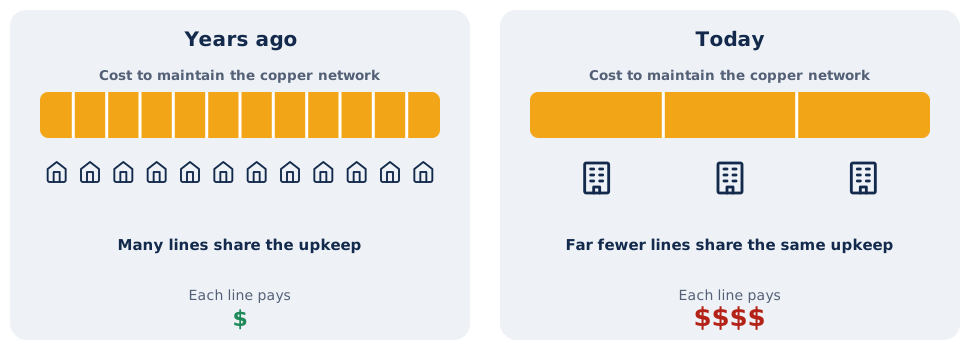
Carriers are using price to push customers off
Many businesses have seen analog lines that once cost $30 to $50 a month climb to $100 or more. In some states, carriers have repriced business lines into the thousands of dollars per month. Prices vary widely by carrier and location, but the direction is the same everywhere.
Hidden costs add up
Most offices have more lines than they realize: a fax line, a line for the alarm, one for the postage meter, and one or two that nobody can explain. Each carries its own fees and taxes. Repairs are also getting slower as carriers stop investing in copper, and copper theft has caused outages in many areas.
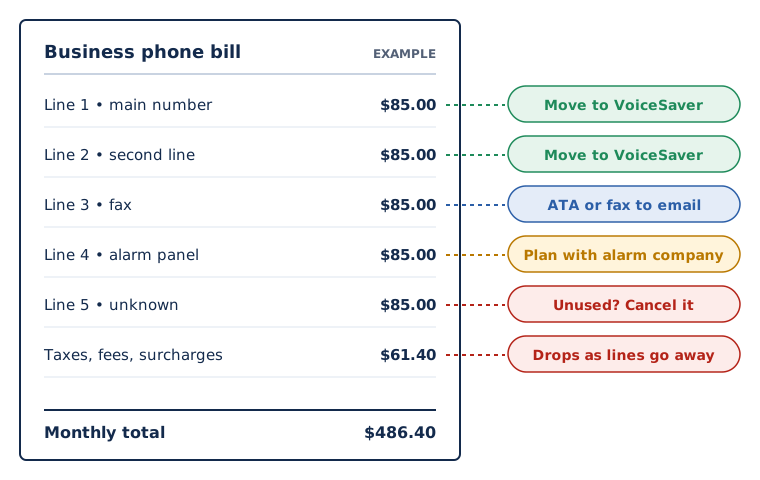
Not sure how many lines you're paying for? Send us your bill for a free phone system audit. We'll list every line, what it seems to be used for, and what it would cost on VoiceSaver.
How an ATA replaces an analog line
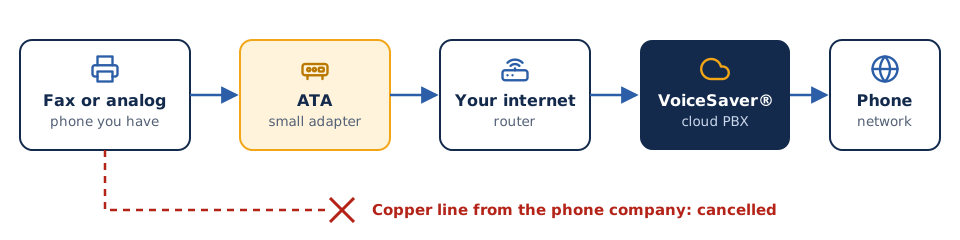
An analog telephone adapter (ATA) is a small box that plugs into your office network. Your fax machine or analog phone plugs into the ATA with a normal phone cord, and the ATA carries the call over the internet to VoiceSaver. From there, calls reach the regular phone network just as they did before.
What you keep
- Your existing phone and fax numbers, moved at no charge
- The devices your staff already know how to use
- Inbound and outbound calling and faxing
What changes
- No more copper line charges from the phone company
- One predictable monthly price from VoiceSaver
- Optional fax to email, so faxes also land in your inbox as PDFs
What can move to an ATA?
Most analog devices move easily. A few need extra planning.
| Device | Our recommendation |
|---|---|
| Fax machine | Connect it to an ATA and keep your fax number, or switch to fax to email and retire the machine. |
| Analog or cordless phones | Connect to an ATA, or replace with a Yealink desk phone or the softphone app. |
| Door, gate, and intercom phones | Usually a good fit for an ATA. We'll confirm the model during setup. |
| Overhead paging | Connect the paging amplifier through an ATA so staff can page from any phone. |
| Credit card terminals | Most modern terminals work better over the internet or cellular. Check with your payment processor. |
| Alarm, elevator, and fire panels | These are life-safety lines with code requirements, such as battery backup. We'll help you plan, working with your alarm company and local fire official. |
A simple example
Your numbers will be different. This shows how to think about the math.
| Example office | Per month |
|---|---|
| 4 analog lines at $100 each | $400 |
| Fees and taxes on each line | Varies |
| Chance the price rises again | High |
On VoiceSaver, the same office pays a monthly price starting as low as $9.99, plus a one-time cost for any ATAs or phones you need. We put both numbers side by side in your quote so you can see the difference before you decide.
How we replace your lines
List every line
We go through your bill and match each line to a device.
Decide line by line
Move it to VoiceSaver, move it to an ATA, or cancel it.
Get your quote
Monthly price plus any ATAs or phones, in writing.
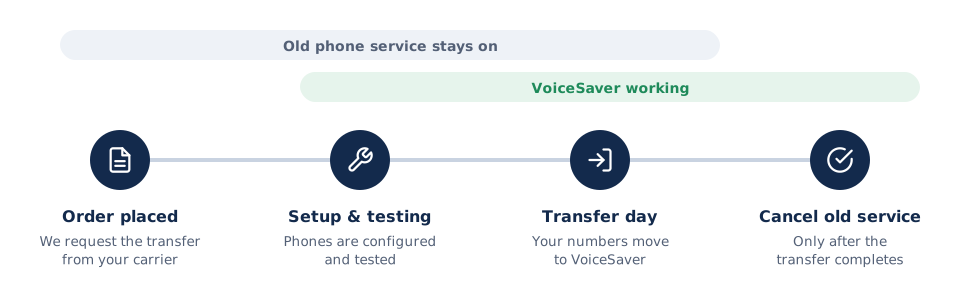
Install and test
We configure the ATAs and test each device before anything changes.
Move your numbers
Your numbers transfer to VoiceSaver. Old service stays on until they do.
Cancel the copper
Once the transfer is complete, cancel the old lines and stop paying for them.
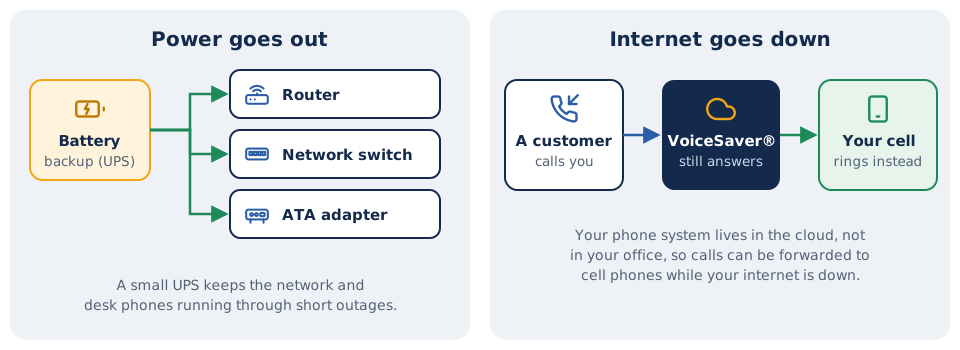
Plan for power and internet outages
ATAs and cloud phones need power and an internet connection. A small battery backup (UPS) covers short power outages, and calls can be forwarded to mobile phones if your internet goes down.
How your numbers move
Last reviewed September 2026. Carrier pricing and retirement schedules change often and vary by location.
See what your analog lines really cost
Send us a recent phone bill and we'll show you every line, what it's for, and what it would cost on VoiceSaver.